Assigning access rights
Access rights can be granted — to individual users or to user groups — from both:
- the Rapidminer® AI Studio software Repository View and Manage Connections dialog
- the Rapidminer® AI Hub software project interface
Assigning access from Rapidminer AI Studio
To assign user access from Rapidminer AI Studio, you must first have created a project and then connected to that project.
Assigning rights to a database connection
Database connection access rights can only be assigned from Rapidminer AI Hub. (You must create the database connection before assigning rights.)
Before a user can run use any operators and/or processes that reference the connection, you must first grant the user access rights on Rapidminer AI Hub Server. This needs to be done by giving the user the right to access the desired Project where the Connection resides in.
Assigning access from Rapidminer AI Hub Server
In Rapidminer AI Hub Server, access rights are assigned from the Projects page.
Assigning rights to resources
Assigning rights to resources means assigning rights on a per-Project base which can be done from the Projects page:
Select a Project, which access rights you want to change and click on the Edit Project button
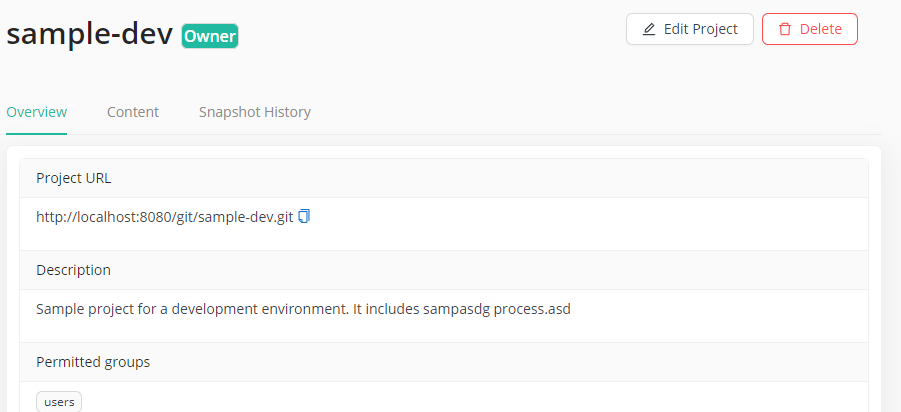
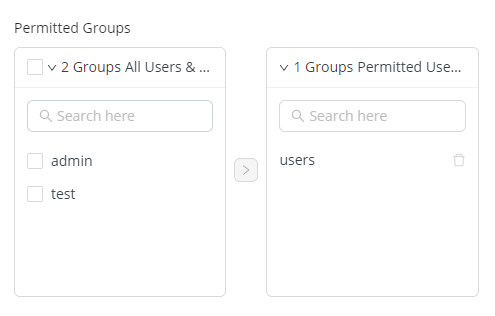
The Permitted Groups box on in the middle of the dialog can be used to add or remove groups
The Owners can be changed in this dialog as well

After all changes are done, you can save the access rights with the Save button